
No products in the cart.
24/7 Online Nitro Pro 13 Official Genuine Original License Key Online Activation for Lifetime PDF software
- Brand: NITRO PRO
Official Store
₦30,000.00₦70,000.00 (-57%)
In stock
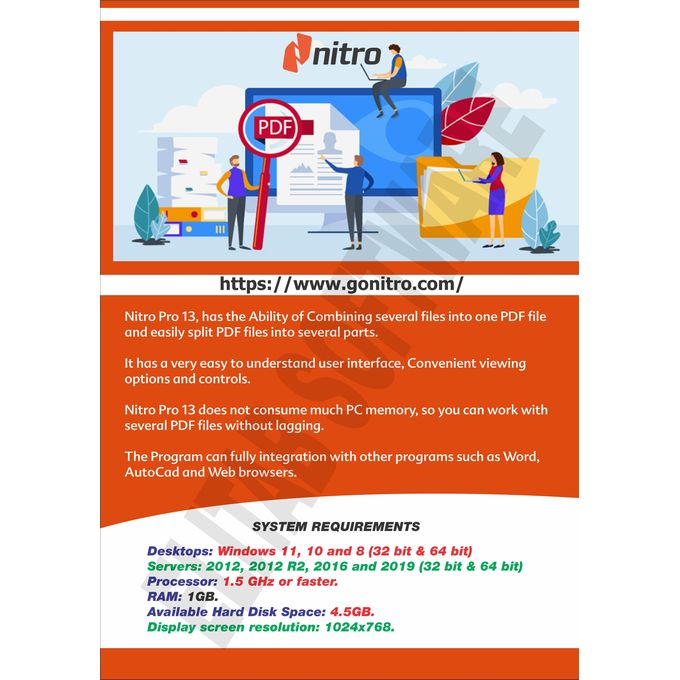
Nitro Pro 13 contains a large number of tools for editing and creating PDF files.You can easily batch process files, you can also scan documents directly to PDF, and you can also combine several files into one and quickly convert to any format.It is worth noting support for exporting files from various office applications, for example, Word, Excel, PowerPoint, and so on. Plus, if you wish, it is easy to make encryption with a high degree of protection, in general, if you do not like the product from Adobe, then this software will be a great alternative for viewing and creating a new document.
24/7 Online Nitro Pro 13
Official Genuine Original
License Key Online
Activation for Lifetime
PDF software
Product details
Create, edit and convert PDF files effortlessly with the help of this intuitive program that also allows users to accurately extracting text from PDFs thanks to its OCR function. Nitro Pro is one of the most advanced PDF creating and editing software solutions, providing basically all the tools you would ever need to help you in this regard. Although it’s called ‘Professional,’ the application has been developed to be aimed at beginners and advanced users alike, so you won’t find it too difficult to use.
Features:- Create PDFs and Combine Files- Create PDFs from virtually any document, image, or file type- Drag and drop to create and combine PDFs- Insert, delete, and organize pages in a PDF- Combine multiple files and file types into one PDF- Deep integration with Office 365, SharePoint 365, OneDrive for Business, Dropbox, Box, Google Drive- Copy and paste selected parts of a PDF file with formatting intact- Batch-create PDF files
Convert Files to and from PDF- Convert Word, PowerPoint, and Excel files to editable PDFs- Convert PDFs into editable Word, PowerPoint, and Excel files- Convert scanned documents into editable, searchable PDFs- Convert PDFs to JPEG, TIFF, or PNG image formats- Convert web pages to interactive PDFs, complete with links- Convert CAD files to PDFs- Convert any PDF file to PDF/A 1 and 2- Extract text and images- Postscript-based document conversion
Apply and Request Electronic Signatures- Request secure, legally binding electronic signatures- Lightweight eSignature workflows, designed for speed and ease of use- Apply your own electronic signature- Digitally sign and certify documents- Send, track, and confirm electronic signatures with real-time notifications and analytics- Easy mobile signing optimized for smartphones and tablets- eSignature templates for frequently used forms- Easily add documents and templates that your whole team can access
Edit PDF files- Insert and edit text and images- Insert and edit fonts, layouts, and pages- Optimize, shrink, and repair PDF files- Visual rotation of images and pages- Insert and edit bookmarks, links, headers, numbering, and watermarks- Insert and edit Bates Numbering- Create searchable and editable PDFs from scans with OCR (Optical Character Recognition)- Smart Alignment tool- Copy and paste between applications- Automatic text reflow and resize- Scanned image detection with automatic deskew
Keep PDFs Secure- Add password protection and permissions to PDFs- Redact to permanently remove sensitive information from PDFs- Create protected PDF files that restrict copying and editing- Secure PDFs with Microsoft Rights Management Services (RMS) 2.0- Encryption support for 64-, 128-, and 256-bit (with R6 support)- Work with digital signatures, including Chain of Trust support- Manage digital signature profiles and certificates- Create and manage digital IDs- Batch security- Document version tracking
Build and Fill PDF Forms- Static XFA form support- PDF form creation and editing- Easily create, fill, sign, send, and store forms
Review, Mark up, and Annotate PDFs- Highlight, cross out, and underline text with annotations- Create annotations using sticky notes, text boxes, call-outs, pencil, and shapes- Attach entire files as annotations- Sort, manage, filter, and summarize comments- Apply dynamic stamp annotations, which auto-populate specific information- Spell check- Compare PDF files- Advanced search allows for increased precision and contextual results- Smart guidelines for Object Tool aligns shapes to ensure content is arranged properly
User-Friendly Interface- Familiar Microsoft Office-style interface for easy adoption- Access your documents from your desktop, browser, or mobile device- Functional on touch-enabled devices- Integrated Microsoft Office toolbar and shortcuts- Outlook plugin to create PDFs from email- Print reduction suggestions- Smart Tips and onboarding product tour- Customizable Home tab- View Optional Content Group (OCG) layers- Floating toolbar for easier access to editing tools- Drag and drop documents into multiple windows- Preview PDF files in Windows Explorer, Outlook, and web browsers
Easy IT Deployment and Management- (Available in Business and Enterprise plans only)- Lightweight deployment with thin, server, and desktop options- Support for App-V and managed servers- Nitro Analytics for insights into printing activity and document workflows- Manage licenses, users, and services via Nitro Admin- NIST 800-53, HIPAA, SOC2 Type 2 certified
Features:- Create PDFs and Combine Files- Create PDFs from virtually any document, image, or file type- Drag and drop to create and combine PDFs- Insert, delete, and organize pages in a PDF- Combine multiple files and file types into one PDF- Deep integration with Office 365, SharePoint 365, OneDrive for Business, Dropbox, Box, Google Drive- Copy and paste selected parts of a PDF file with formatting intact- Batch-create PDF files
Convert Files to and from PDF- Convert Word, PowerPoint, and Excel files to editable PDFs- Convert PDFs into editable Word, PowerPoint, and Excel files- Convert scanned documents into editable, searchable PDFs- Convert PDFs to JPEG, TIFF, or PNG image formats- Convert web pages to interactive PDFs, complete with links- Convert CAD files to PDFs- Convert any PDF file to PDF/A 1 and 2- Extract text and images- Postscript-based document conversion
Apply and Request Electronic Signatures- Request secure, legally binding electronic signatures- Lightweight eSignature workflows, designed for speed and ease of use- Apply your own electronic signature- Digitally sign and certify documents- Send, track, and confirm electronic signatures with real-time notifications and analytics- Easy mobile signing optimized for smartphones and tablets- eSignature templates for frequently used forms- Easily add documents and templates that your whole team can access
Edit PDF files- Insert and edit text and images- Insert and edit fonts, layouts, and pages- Optimize, shrink, and repair PDF files- Visual rotation of images and pages- Insert and edit bookmarks, links, headers, numbering, and watermarks- Insert and edit Bates Numbering- Create searchable and editable PDFs from scans with OCR (Optical Character Recognition)- Smart Alignment tool- Copy and paste between applications- Automatic text reflow and resize- Scanned image detection with automatic deskew
Keep PDFs Secure- Add password protection and permissions to PDFs- Redact to permanently remove sensitive information from PDFs- Create protected PDF files that restrict copying and editing- Secure PDFs with Microsoft Rights Management Services (RMS) 2.0- Encryption support for 64-, 128-, and 256-bit (with R6 support)- Work with digital signatures, including Chain of Trust support- Manage digital signature profiles and certificates- Create and manage digital IDs- Batch security- Document version tracking
Build and Fill PDF Forms- Static XFA form support- PDF form creation and editing- Easily create, fill, sign, send, and store forms
Review, Mark up, and Annotate PDFs- Highlight, cross out, and underline text with annotations- Create annotations using sticky notes, text boxes, call-outs, pencil, and shapes- Attach entire files as annotations- Sort, manage, filter, and summarize comments- Apply dynamic stamp annotations, which auto-populate specific information- Spell check- Compare PDF files- Advanced search allows for increased precision and contextual results- Smart guidelines for Object Tool aligns shapes to ensure content is arranged properly
User-Friendly Interface- Familiar Microsoft Office-style interface for easy adoption- Access your documents from your desktop, browser, or mobile device- Functional on touch-enabled devices- Integrated Microsoft Office toolbar and shortcuts- Outlook plugin to create PDFs from email- Print reduction suggestions- Smart Tips and onboarding product tour- Customizable Home tab- View Optional Content Group (OCG) layers- Floating toolbar for easier access to editing tools- Drag and drop documents into multiple windows- Preview PDF files in Windows Explorer, Outlook, and web browsers
Easy IT Deployment and Management- (Available in Business and Enterprise plans only)- Lightweight deployment with thin, server, and desktop options- Support for App-V and managed servers- Nitro Analytics for insights into printing activity and document workflows- Manage licenses, users, and services via Nitro Admin- NIST 800-53, HIPAA, SOC2 Type 2 certified
Additional information
| Weight | 0.1 kg |
|---|
Only logged in customers who have purchased this product may leave a review.
No more offers for this product!
Shipping Policy
Delivery
Estimated delivery time: 1 - 14 days
Express Delivery Available
Same day delivery: Order before 11AM and get it today
Next day delivery: Order after 11AM and get it tomorrow
Note : Subject to availability in your area
Refund Policy
7 Day Return Guarantee
For more information on the return shipping options and refund policy
Cancellation / Return / Exchange Policy
General Inquiries
There are no inquiries yet.

English
French
German 


Reviews
There are no reviews yet.